
Choosing the best tools for creating interactive e-learning content is one of the most impactful decisions a training team, educator, or business can make in 2026. E-learning courses with gamified elements achieve a 90% completion rate, compared to just 25% for courses without gamification, which means the tools you choose directly determine whether your learners actually finish what they start.
Key Takeaways
Question |
Answer |
|---|---|
What is the best tool for creating interactive e-learning content overall? |
Articulate Storyline 360 is widely considered the most powerful and versatile tool for interactive e-learning in 2026, with advanced branching and responsive output. |
Which e-learning authoring tool is best for small business teams? |
iSpring Suite and Lectora Online are both strong choices for small business teams due to their accessible learning curves and team collaboration features. |
Are there free tools for creating interactive e-learning? |
H5P is a free, open-source platform that allows creators to build interactive videos, quizzes, and branching scenarios without a license fee. |
What features should I look for in interactive e-learning tools? |
Prioritize gamification, branching scenarios, mobile responsiveness, AI content generation, and SCORM/xAPI compatibility for maximum flexibility. |
Can interactive e-learning tools support scaleable growth? |
Yes. Cloud-based platforms like Adobe Captivate and Rise 360 are designed to scale with your team, supporting everything from solo creators to enterprise L&D departments. |
How much do interactive e-learning authoring tools cost? |
Costs range from free (H5P) to around $1,299/year (Articulate 360), with mid-range options like iSpring Suite available from approximately $770/year. |
Do I need a growth partner to implement an e-learning strategy? |
For businesses building training at scale, working with a dedicated growth partner can help align your e-learning investment with broader business objectives. |
What Makes a Tool Worthy of the Title: Best Tool for Creating Interactive E-Learning Content?
Not every authoring tool earns the label. The best tools for creating interactive e-learning content share a handful of non-negotiable traits that separate genuinely useful platforms from those that simply look impressive in demos.
We look for tools that offer branching scenario builders, quiz and assessment engines, gamification layers, and responsive output that works across every device. Beyond the feature list, the best platforms are those that your team can actually use without a six-month onboarding process.
Interactivity depth: Can you build click-to-reveal, drag-and-drop, hotspot, and branching experiences natively?
Mobile-first output: Does the content render perfectly on smartphones and tablets without rebuilding?
LMS compatibility: Does the tool export SCORM, xAPI (Tin Can), or AICC packages?
Collaboration support: Can multiple team members review and edit content simultaneously?
AI content assistance: Does the platform use AI to accelerate course build time?
Gamification features: Are badges, leaderboards, and points built in or easily integrated?
Analytics and reporting: Can you track completion, scores, and learner behavior in real time?
Keep these criteria in mind as we walk through our curated list of the best tools for creating interactive e-learning content available right now in 2026.
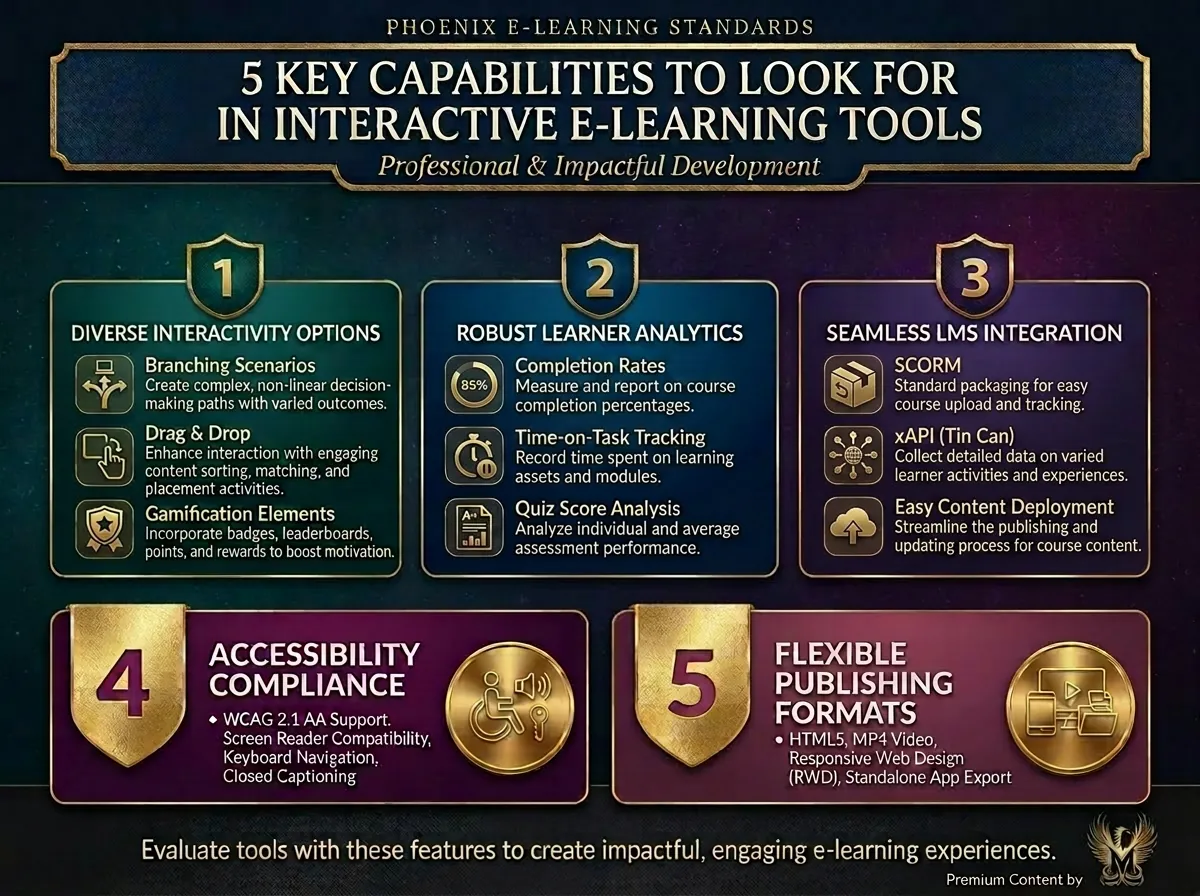
Discover the top five capabilities to evaluate when choosing tools for interactive e-learning content. This visual guide highlights what to prioritize for engaging and effective learning experiences.
Best Tools for Creating Interactive E-Learning Content: Our Full 2026 Picks
We’ve evaluated each platform across real-world use cases, pricing structures, output quality, and support ecosystems. Here is the full breakdown of the best tools for creating interactive e-learning content this year.
1. Articulate Storyline 360 — Best for Complex Branching and Custom Interactivity
Articulate Storyline 360 remains the gold standard for instructional designers who need fine-grained control over every learner interaction. It uses a slide-based authoring interface that gives creators the ability to build sophisticated branching scenarios, animated characters, and trigger-based logic without needing to write code.
Best for: Mid-to-large teams with dedicated instructional designers who need maximum creative freedom.
Deep branching scenario builder with conditional triggers
Native motion path animations and interactive layers
SCORM, xAPI, AICC, and cmi5 output
Responsive preview mode with device-specific controls
Articulate Review for stakeholder feedback
Pricing: Included in Articulate 360 at approximately $1,299/user/year (team plans available).
2. Articulate Rise 360 — Best for Fast, Responsive Course Builds
Rise 360 is the browser-based sibling of Storyline, and it is built entirely around responsive design from the ground up. You build in blocks rather than slides, and the output automatically adapts to any screen size without any manual adjustment.
Best for: Teams that need to produce polished, mobile-ready interactive content quickly without deep instructional design expertise.
Block-based authoring with 40+ pre-built interaction types
100% responsive output with no extra configuration
Native quiz, scenario, and timeline blocks
Real-time collaboration with team members
Seamless integration with Storyline blocks for custom interactions
Pricing: Included in Articulate 360 subscription.
Did You Know?
Learners retain 25% to 60% more information through interactive e-learning compared to just 8% to 10% in traditional classroom settings.
3. Adobe Captivate — Best for Simulations and Software Training
Adobe Captivate has long been the tool of choice for building software simulations, screen recordings, and click-through walkthroughs. In 2026, it has added a robust AI assistant that helps auto-generate quiz questions and course narration from existing documents.
Best for: IT teams, SaaS companies, and enterprise training departments that need to build software simulation training at scale.
Screen recording and software simulation engine
Virtual Reality (VR) module for immersive learning experiences
AI-powered quiz and narration generation
Advanced responsive design with fluid boxes
SCORM 1.2, SCORM 2004, and xAPI output
Pricing: From approximately $33.99/month (Creative Cloud individual plan).
4. iSpring Suite — Best Tool for PowerPoint-Based Teams Creating Interactive E-Learning
iSpring Suite is the most practical choice for teams that already live in PowerPoint. It adds a comprehensive set of interactive e-learning authoring capabilities directly inside the PowerPoint interface, which means your existing slides become the foundation for fully interactive SCORM-ready courses.
Best for: Small business teams, subject matter experts, and organizations that want a minimal learning curve without sacrificing output quality.
PowerPoint-native authoring environment
Built-in quiz maker with 14 question types
Role-play conversation simulator for soft skills training
Video lecture recording and editing tools
SCORM and xAPI output compatible with all major LMS platforms
Pricing: From approximately $770/user/year.
5. H5P — Best Free Tool for Creating Interactive E-Learning Content
H5P is an open-source framework that runs directly in your browser or inside platforms like Moodle, WordPress, Canvas, and Drupal. It offers over 50 content types, from interactive video and branching scenarios to memory games and virtual tours.
Best for: Educational institutions, solo creators, and any organization that needs powerful interactivity without a tool licensing budget.
Completely free and open-source
Integrates natively with Moodle, WordPress, Blackboard, and Canvas
50+ content types including interactive video and branching scenarios
xAPI output for LMS tracking
Active community with regular updates and new content types
Pricing: Free (H5P.com hosted plans start from $8/month for additional features).
6. Lectora Online — Best for Accessibility-Compliant Interactive E-Learning
Lectora Online is the top choice when accessibility compliance is a non-negotiable requirement. It has the most robust built-in support for Section 508, WCAG 2.1, and ADA standards of any major authoring tool on the market.
Best for: Government agencies, healthcare organizations, and any business with legally mandated accessibility requirements.
Industry-leading accessibility compliance (WCAG 2.1 AA)
Cloud-based with real-time team collaboration
Inherited branching and title-level variables
Integrated with ReviewLink for stakeholder feedback
SCORM, xAPI, and AICC output
Pricing: From approximately $1,299/user/year.
7. Vyond — Best for Animated Video-Based Interactive E-Learning
Vyond is the leading platform for creating professional animated video content without a design team. In 2026, its AI script writer and voice generator allow content teams to go from a text prompt to a fully voiced animated scene in minutes.
Best for: Marketing teams, HR departments, and any organization using video as the primary medium for interactive learning content.
AI script writer and character animator
AI voice generator with 100+ languages and accents
Customizable characters, props, and backgrounds
Direct export to common video formats and LMS platforms
Team collaboration with brand kits
Pricing: From approximately $49/month (Essential plan).
Best Tools for Creating Interactive E-Learning Content for Small Business Teams
We know that small business training budgets look very different from enterprise L&D departments. The good news is that the best tools for creating interactive e-learning content in 2026 have democratized capabilities that used to require a full instructional design team.
For a small business, the priority is typically speed, ease of use, and cost efficiency. Here is how we rank the options specifically for smaller teams:
Tool |
Best For Small Business When... |
Starting Price |
|---|---|---|
iSpring Suite |
Team already uses PowerPoint and needs SCORM output fast |
~$770/year |
H5P |
Budget is tight and the team uses WordPress or Moodle |
Free |
Rise 360 |
Mobile-first audience and fast content turnaround is needed |
~$1,299/year (bundled) |
Vyond |
Video is the primary format and there is no design team |
~$49/month |
Adobe Captivate |
Software training is the core use case with an existing CC subscription |
~$33.99/month |
If you are a small business unsure about which stage of digital infrastructure to build first, reading about how to scale a small business will give you a useful framework for sequencing your technology investments, including your learning platforms.
How Gamification Features Separate the Best Interactive E-Learning Tools
Gamification is no longer a “nice to have” inside interactive e-learning. It is a core driver of whether learners return to your content or abandon it after the first module.
When evaluating the best tools for creating interactive e-learning content, we pay close attention to how deeply gamification features are built into the native authoring experience rather than bolted on as an afterthought.
Articulate Storyline 360: Supports gamification through trigger logic, custom variable tracking, and third-party integration with LMS leaderboard systems.
iSpring Suite: Includes a native role-play simulator that functions as a gamified conversation practice engine.
H5P: Offers branching scenarios and memory card games as native content types.
Adobe Captivate: Supports badges, point systems, and learning paths through its integration with Adobe Learning Manager.
The platforms that build gamification directly into the authoring workflow save your team significant integration work and produce a more consistent learner experience across all your courses.
AI-Powered Features in the Best Tools for Creating Interactive E-Learning Content
AI has fundamentally changed what a solo instructional designer or a lean small business team can produce in a single sprint. In 2026, every credible authoring platform has introduced some form of AI-assisted content generation.
AI-powered authoring tools can generate course content up to 9x faster than traditional manual methods by building from source material or prompts. This changes the economics of interactive e-learning production significantly for any team.
Here is how the leading platforms compare on AI capability:
Adobe Captivate AI: Converts PDFs and documents into structured course slides automatically, with AI-generated quiz questions from source material.
Vyond AI: Generates full animated video scripts, voiceovers, and character actions from a text brief.
Articulate AI (Rise 360): Offers block-level AI content suggestions, quiz question generation, and lesson outline creation from a topic prompt.
iSpring AI: Includes a built-in AI content assistant that drafts course outlines and slide text from a document upload.
For businesses pursuing scaleable growth, investing in AI-enabled authoring tools is one of the highest-leverage moves available. Your team produces more content, faster, without proportionally increasing headcount.
Did You Know?
AI-powered authoring tools can generate course content up to 9x faster than traditional manual methods by building from source material or prompts.
Building a Scaleable Growth Strategy Around Your E-Learning Stack
Choosing the right tools is only half the challenge. The other half is building a structure around those tools so your e-learning operation becomes a genuine driver of scaleable growth, rather than a one-off project that fades after launch.
The most effective organizations treat their interactive e-learning content as a product that is continuously iterated on based on learner data. They connect their authoring tools to an LMS that provides completion tracking, quiz performance data, and engagement analytics, then use that data to improve courses on a rolling cycle.
For businesses that want a structured approach to growth investment decisions, including decisions about learning technology, the Phoenix Ascent Framework provides a practical model for sequencing where to invest based on your current business stage.
The framework moves businesses through Digital Launch, Launch Infrastructure, Foundation Growth, and a full growth partner engagement, each stage building the systems and strategies needed to support the next level of scale.
“The best interactive e-learning tool is the one your team will consistently use, your learners will actually complete, and your data systems can track. Everything else is secondary.”
How a Growth Partner Approach Applies to E-Learning Investment
Working with a growth partner changes the way a business approaches its training technology investment. Rather than purchasing tools reactively based on whoever presents the most compelling demo, a growth partner helps you define the actual business outcome you need, and then work backward to identify the right tools and infrastructure.
For a small business building out its first formal training program, this distinction matters enormously. The wrong tool at the wrong stage wastes budget and creates technical debt. The right tool, implemented with a clear strategy and KPIs attached, becomes a genuine asset that compounds in value over time.
The Phoenix Ascent Framework approach to scaleable growth emphasizes exactly this kind of structured, stage-appropriate investment. You can explore how this applies to your business in detail by reading about scaling a small business with a structured growth framework.
Mobile Optimization: A Non-Negotiable for the Best Interactive E-Learning Tools
70% of learners complete their courses on mobile devices when content is properly optimized for mobile-first consumption. Any tool that doesn’t produce fully responsive output is simply not a viable choice for a modern e-learning operation.
Here is how our top picks handle mobile output:
Rise 360: 100% responsive by default. No additional configuration needed. Every block adapts automatically.
Storyline 360: Responsive player with device-specific preview modes. Requires some deliberate design to ensure touch targets are appropriate.
H5P: Fully responsive across all 50+ content types. Works inside any mobile browser.
Adobe Captivate: Fluid box responsive design system allows granular control over how elements reflow on smaller screens.
iSpring Suite: Outputs HTML5 content that is responsive and tested across major mobile browsers.
If your learner base is predominantly mobile (and in 2026, most are), mobile output quality should be a primary evaluation criterion when selecting the best tools for creating interactive e-learning content.
Conclusion
Finding the best tools for creating interactive e-learning content in 2026 comes down to matching the right platform to your team’s size, technical confidence, budget, and the specific type of interactivity your learners need. Articulate Storyline 360 leads for complex custom builds, Rise 360 wins for speed and mobile output, iSpring Suite is the practical choice for PowerPoint-native teams, and H5P remains the strongest free option on the market.
For small business teams and growing organizations, the most important decision is not which tool has the longest feature list. It is which tool your team will actually use consistently to produce content that your learners complete. Pair the right authoring tool with a clear content strategy, a connected LMS, and a scaleable growth plan, and your e-learning investment will compound in value over time rather than collecting dust after the first course launch.
If you are ready to think about your digital training investment within a broader business growth context, working with a dedicated growth partner who understands how to structure technology decisions at each stage of business development is a logical next step.
Frequently Asked Questions
Articulate Storyline 360 holds the top spot for teams that need deep interactivity and custom branching. For teams that prioritize speed and mobile-first output, Articulate Rise 360 is the best tool for creating interactive e-learning content without a steep learning curve.
iSpring Suite and Rise 360 are the two best tools for creating interactive e-learning content when you have a lean team without dedicated instructional designers. Both reduce the technical barrier significantly while still producing professional, LMS-compatible output.
Yes, H5P is a genuinely professional tool for creating interactive e-learning content, particularly for institutions and businesses already using Moodle, WordPress, or Canvas. It lacks some of the polished UI templates of paid tools, but its interactivity depth and xAPI output make it a legitimate choice for serious programs.
AI features in the best tools for creating interactive e-learning content now handle script drafting, quiz question generation, image sourcing, and even voiceover production from a single document upload or text prompt. This reduces course production time from weeks to days for experienced teams.
SCORM tracks basic completion and quiz scores and is supported by virtually every LMS on the market. xAPI (also called Tin Can) tracks a much richer set of learner behaviors including offline activity and mobile interactions, making it the better choice for sophisticated interactive e-learning programs.
Absolutely. Cloud-based tools like Rise 360, Lectora Online, and Adobe Captivate are explicitly built for scaleable growth, supporting unlimited course libraries, team authoring, and LMS integrations that expand with your audience without requiring you to rebuild your content infrastructure.
For any small business that trains employees, onboards clients, or sells courses online, investing in the best tools for creating interactive e-learning content produces measurable returns through faster onboarding, lower training costs, and higher knowledge retention rates. The key is matching the tool to your current stage of growth rather than buying for where you hope to be in five years.